Tutorial
In today's world, where we are constantly connected and inundated with information, notifications are a fundamental and indispensable aspect of every user's daily digital experience. These messages - sent by applications, websites, or online services - are necessary to keep us informed and updated on the latest events, whether they are of a general nature or, more importantly, if the information is related to a work ecosystem.
Different types of notifications
Given the importance of notifications in conveying changes, there are two main types that have some key differences:
Push notifications; their greatest strength is immediacy. They are sent directly to the user's device, whether it be a smartphone or a computer. They can generally come from applications installed on the device or from websites that have expressly requested permission to send them. They usually notify the user via a pop-up and are collected in a dedicated list within the application.
Email notifications; they are less immediate than the former in the sense that to view them, it is necessary to divert attention from the application being used to move it towards the email inbox. However, they have the advantage of being able to be archived in a more orderly and long-lasting manner.
As mentioned at the beginning, these two types of notifications have key differences. If push notifications are immediately visible to the user, email notifications require the action of opening the mailbox. If email notifications are very flexible (being able to contain images, links, and more), push notifications are more limited both in content and in their organization.
These are just examples, the list of pros and cons could go on forever. Precisely because of this complementarity of one type and the other, it is always convenient to receive both rather than focusing only on one.
Attention to quantity
It is clear at this point what the role of notifications is and what advantages they bring to each of us in the user experience. However, there is one thing to be aware of that risks making the result of sending a notification counterproductive, namely sending an excessive number of notifications, often uninteresting for that type of user.
In fact, bombarding the user with every type of information could have the opposite effect, i.e., that every notification - even the most important one - risks being ignored because of being bored by the continuous receipt of updates. This is where it becomes crucial to be able to configure notifications, both by those who manage the application and by those who use it, in order not to miss anything important.
Notifications on ApiShare
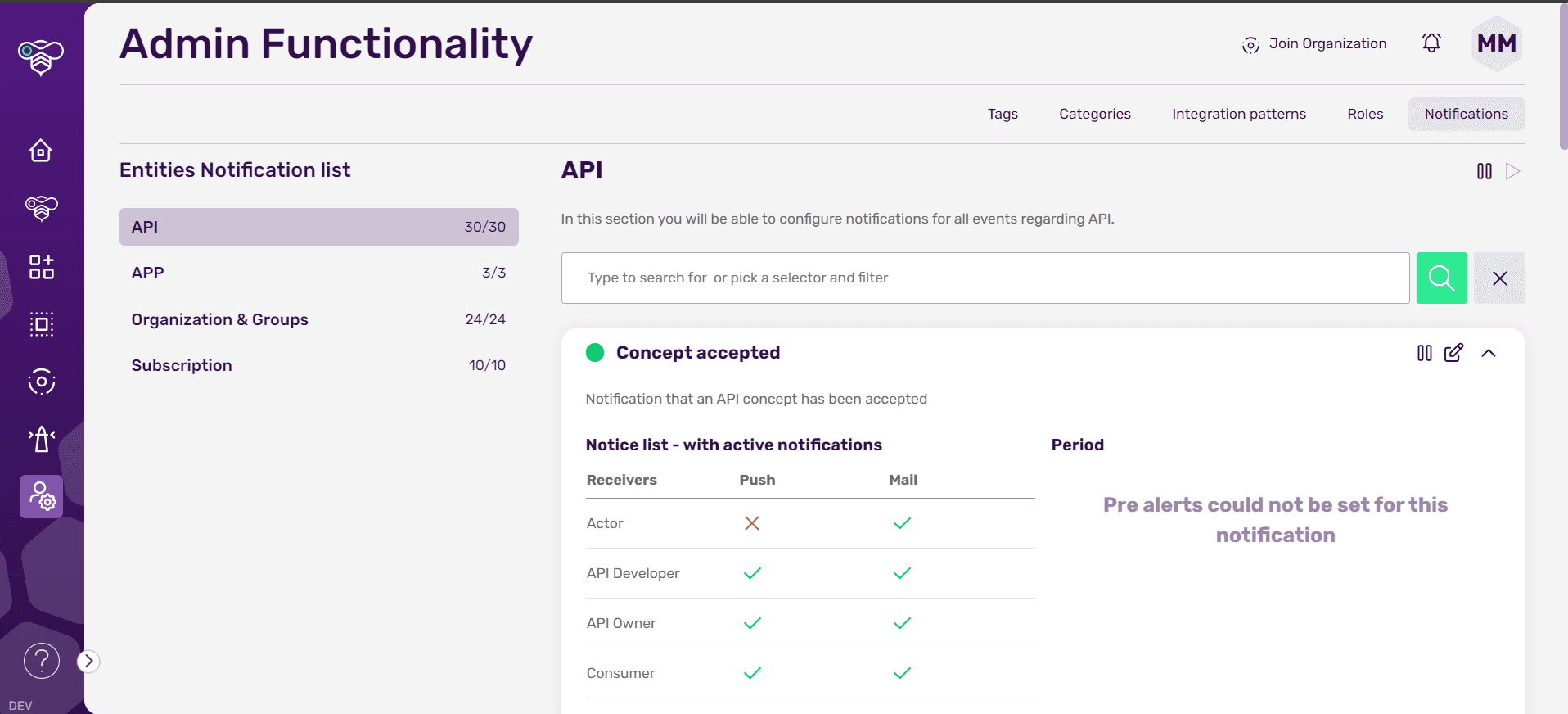
In ApiShare, the configurability aspect of notifications is as customizable as it gets. Within the dedicated admin section of the tenant, it is indeed possible to choose, for each type of role present within the ecosystem, not only which notifications this receives or not, but also whether to deliver them via email or as a push notification.
In addition to this granularity, a notification can be paused without changing the configuration of each receiver. This means that if you have set which roles will receive push notifications and which emails and then pause the notification, when it is put back in play, the old configuration will be restored.
For notifications that require a warning (such as, for example, the alert for the deprecation of an API), it is possible to decide arbitrarily with how many days' notice to deliver that notification.
Notifications based on entities
Notifications are divided into macrotypes that reflect the main entities within ApiShare, so we have:
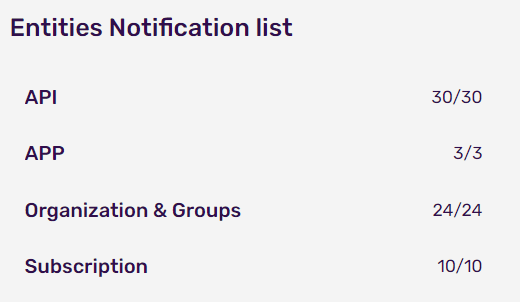
APIs; notifications related to every state change in the lifecycle, any errors it may encounter, upcoming deadlines and so on...
Apps; notifications related to the state change in the lifecycle
Organizations and Groups; notifications about sending invitations, confirmation codes, password recovery, entering or leaving groups, and so on...
Subscriptions; notifications divided into incoming and outgoing subscriptions, all related to their lifecycle
From this breakdown, it is possible to see at a glance how many notifications are in play in relation to the total number.
User-configurable notifications
At this point in the article, it will be clear how much it is possible to model the notification system within ApiShare making communication clear and effective. There is one last possibility, left to the users, of configuration. In fact, each user can choose whether to receive via email the notifications of one macrotype or another, despite being configured as a receiver assigned by the tenant owner. This degree of freedom allows the user to pay more attention to an email received from ApiShare because, having himself decided what to receive and what not, he will know that it will contain important information for him.
Explore more, dive into the world of ApiShare!
Now that you’ve had the opportunity to learn how to effectively manage notifications, take a look at our other articles on our blog and feel free to contact our team if you want to learn even more about ApiShare.