Tutorial

Managing an API ecosystem with large teams can be quite challenging. That's because a team with many members, each with their own degree of expertise and visibility, requires different levels of responsibility and control. Roles and permissions, therefore, need to be tailored accordingly, but they must also be kept flexible and adaptable to organizational changes.
Why roles are important
Based on our experience, for a successful API Program, the definition of an Operative Model and proper Governance has the same value of a best-of-breed API Management platform solution. Therefore, a core pillar of our service is determining the optimal governance structure by identifying all stakeholders and their responsibilities, namely their roles.
This has obvious benefits:
Creates a more streamlined and reliable workflow.
Helps team members avoid unwanted changes to the organization's assets.
Helps users to focus on their tasks.
So, who on your team can create, edit, or deploy an API? Who can control how it’s used? And who can just view it? Let’s see how ApiShare has addressed these questions, so that you, whether you are a developer, an architect, or a product manager, can more easily focus on your tasks.
ApiShare’s (default) roles and permissions
ApiShare has a default set of roles, each with its own visibility and permissions, thereby providing some separation of duties, while ensuring broader access to the more authoritative roles. The roles in this configuration are hierarchical, thus every role inherits the permissions of the role below it.
The default set of roles is the following:
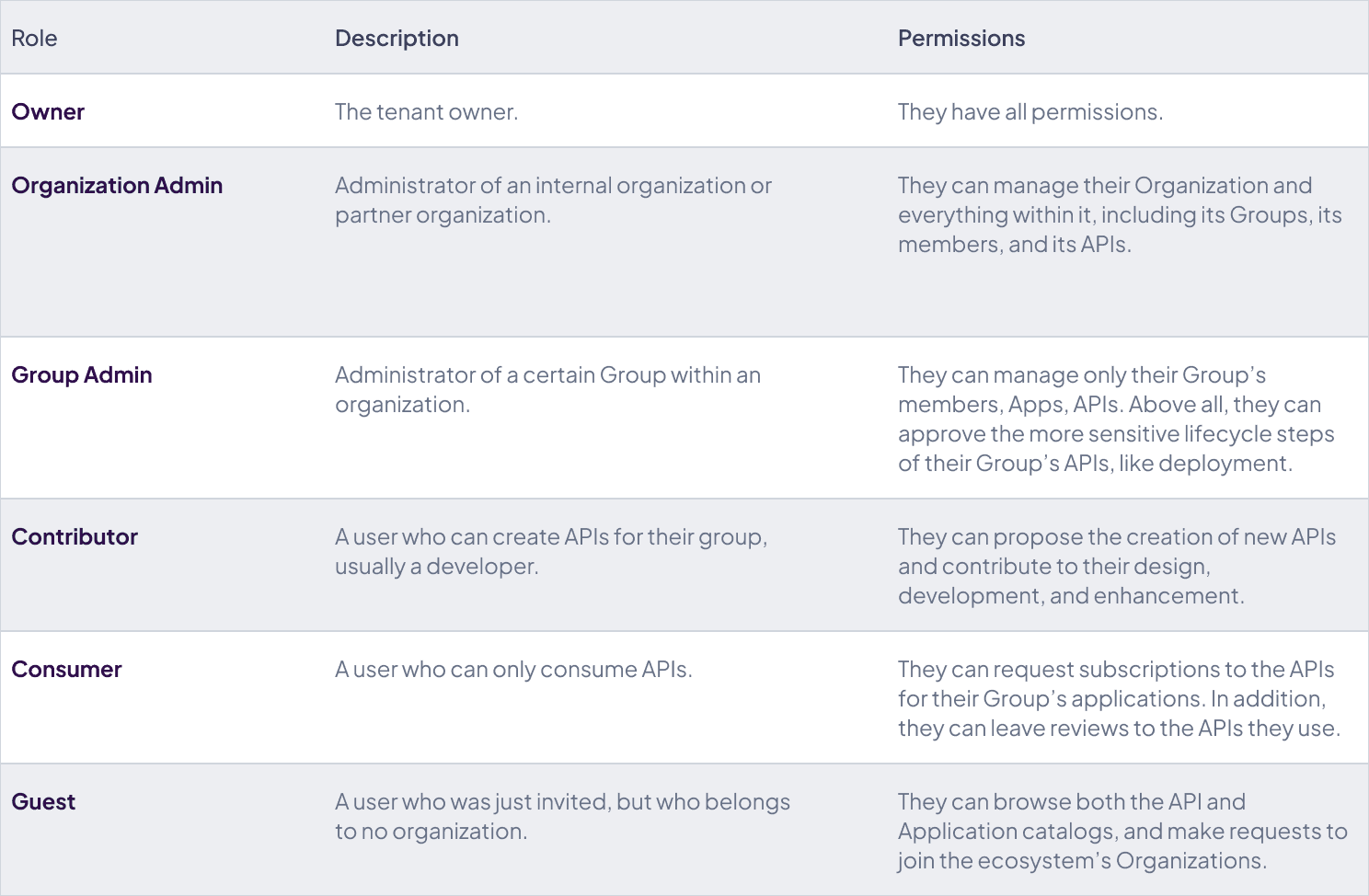
The scope of each role
Usually, for any one project, a user only has a single role, and thus a single set of permissions at a time. However, if a particular user happens to work on multiple projects, or, more closely to the reality of API management, if a user has to consume or contribute to APIs for different Organizations or departments within a company, they ought to have the most appropriate role within each Organization.
Therefore, in ApiShare, aside from the Owners and Guests (who do not belong to a specific Organization), all roles are scoped to each of the Organizations a user might belong to.
In other words, a user has a role within their Organization. (More accurately, within the Group of the Organization they belong to). So, if a user belongs to more than one Organization, they shall have a specific role in each of them. For example, a user can be a Consumer of APIs for the Data Scientists Organization, as well as a Contributor of APIs for the R&D Organization.
Configurability
We’ve seen how ApiShare’s default role configuration tackles the challenge of assigning responsibilities and visibility within an API management ecosystem. However, from years of experience in the business, we know that defaults may not always cut it. That's why, for enterprise subscriptions, at the time of setup, we offer the option of tailoring the default configuration, from the number of roles, to their permissions and visibility.
Do not hesitate to contact our team to find out how we can tailor ApiShare’s user Roles and Permissions to best suit your company’s needs!