Search...

Out of support

Search...

Out of support

Introduction

Digital products: from producers to consumers

The Platform lets organizations design, organize and govern their digital products (REST APIs, MCP servers, AI Agents and any other type of product they define) through a unified operational model for lifecycle, access and reuse.

Every digital product connects two points of view: those who create and publish it, the producers, and those who discover it and use it, the consumers. This page describes who producers and consumers are, which digital products they work with, which tools of the Platform each of them uses most, and finally the lifecycles that digital products follow when an organization chooses to govern them step by step. Applications, through which consumers use digital products, are described in Applications catalog.

Producers and consumers

Producers are the people and teams who build digital products and make them available to others: developers, technical leads, product and API owners, architects. They work mainly in the Workspace, where they describe their digital products, document them, decide who can see them, publish them and manage the requests to use them.

Consumers are the people and teams who need digital products to build their own solutions: developers of other applications, partners, business analysts looking for existing capabilities. They start from the Active Catalog, where they search and evaluate digital products, and then use them through their applications, for example by subscribing to an REST API Product and receiving the credentials to call it.

The same person can be both: a team that publishes an API often consumes APIs published by others. In the Platform, what each user sees and can do depends on the role, the type of user and the visibility settings configured by the administrator, so the real profiles range from the developer to high-level business figures. See Roles and Permissions for the default roles.

Roles, types of user, visibility and profiling are configured in real time by the administrator, according to the needs of each installation. The tools described below may therefore be visible or available only to some users.

Digital products

A digital product is any capability that a producer makes available to consumers and that the Platform describes, governs and shows in the catalog. The Platform manages the following types:

  • API Products: business-level APIs designed for application integration. They are exposed by a producer application, published on the gateway in one or more environments and consumed through subscriptions.

  • API Assets: technical backend services that power API Products but are not directly exposed to consumers. One Asset can back several API Products.

  • MCP servers: expose tools, prompts and resources to LLMs through the Model Context Protocol. Their catalog page shows the information needed to integrate them, such as the server configuration and card.

  • AI Agents: communicate and collaborate with other AI agents through the A2A protocol. Their catalog page shows the agent card.

  • Custom digital product types: defined by the administrator, with their own templates and fields, to describe any other kind of digital product of the ecosystem.

Assets, MCP servers, AI Agents and custom digital product types are available if enabled for your installation.

All digital products share the same foundations: they belong to an Organization and a Group, have documentation and attachments, are shown in the Active Catalog according to their visibility, and follow a lifecycle governed by role permissions.

Tools for producers and consumers

The following table summarizes the main tools of the Platform and who uses them most. It is a guide, not a rule: the actual availability of each tool depends on the configuration of your installation.

Tool

What it is for

Mostly used by

Workspace

Create and manage digital products, Assets and applications, follow their lifecycle and their history.

Producers

Designer

Build the OpenAPI definition of REST APIs, including data models with the Schema builder.

Producers

Documentation

Write and organize the documentation of each digital product; read it from the catalog.

Producers (write), consumers (read)

Visibility

Decide which organizations and users can see a digital product in the catalog.

Producers, administrators

Subscriptions

Request access to an API Product (requested subscriptions) or approve the requests of others (received subscriptions).

Consumers (request), producers (approve)

Network

Keep the registry of the IP addresses used by consumer applications and approve their association with lists.

Administrators, security managers

Active Catalog

Search, filter and evaluate all digital products, in card or table view, and start a subscription.

Consumers

Applications

Represent the systems that expose or consume digital products; each subscription belongs to an application.

Consumers and producers

Key sets

Manage the credentials received with subscriptions.

Consumers

AI assistants

The Discovery Agent helps search and explore the contents of the Platform; the Designer assistant helps write API definitions.

Consumers (Discovery Agent), producers (Designer assistant)

Administration

Configure digital product types and templates, roles, visibility, profiling, notifications and the other settings of the tenant.

Administrators

The AI assistants (Discovery Agent and the Designer assistant) are available only if enabled for your installation.

Lifecycles

Every digital product follows a lifecycle: a sequence of states that goes from the first idea to retirement. The lifecycle is a governance tool. Organizations that want to control each step use it to require proposals, reviews and approvals; organizations that prefer a lighter process can move quickly through the states. Who can perform each step depends on role permissions (see Roles and Permissions).

The lifecycle is divided into macro-states, each with its own sub-states. The sections below describe the lifecycle of each type of digital product. The lifecycle of applications is described in Applications catalog.

Digital product lifecycle (MCP servers, AI Agents and custom types)

Digital products other than APIs follow a simple lifecycle, without publication on multiple environments:

  • Concept, Draft: the initial state when the digital product is created. The producer fills in its information, specifications and attachments.

  • In Progress, Pending for publishing: the digital product has been submitted (Submit) and is ready to be published.

  • Published, Live: the digital product has been published (Publish) and is available in the Active Catalog, according to its visibility.

  • Retired, Retired: the digital product has been retired (Retire) and is no longer offered to consumers.
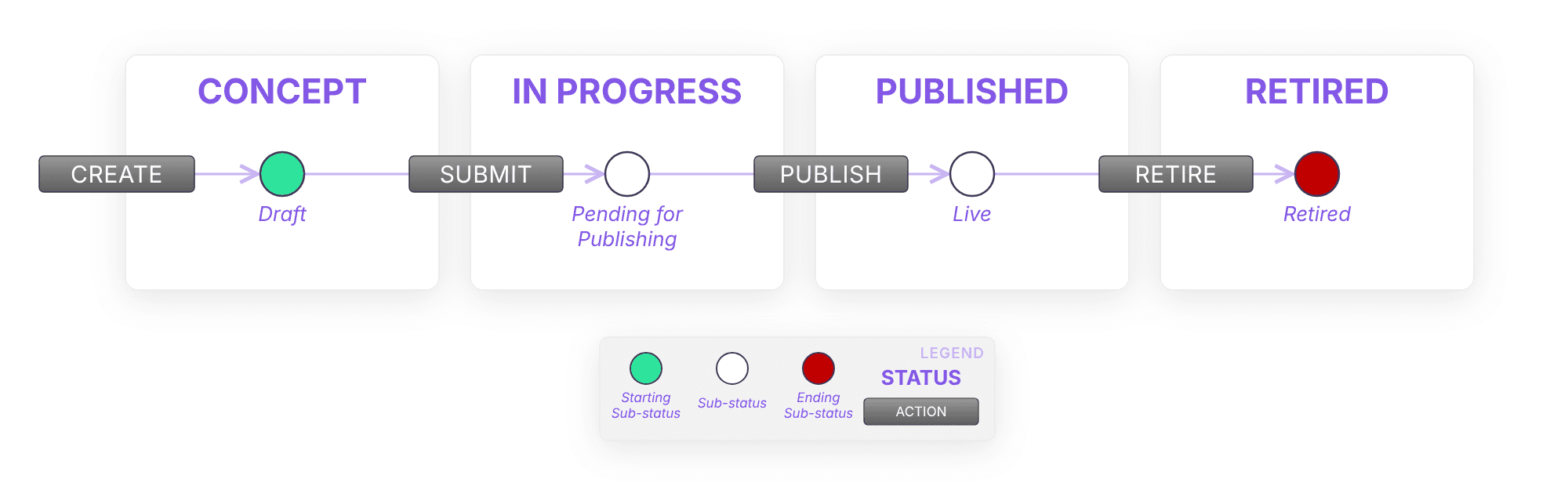
Digital product lifecycle: concept, in progress, published and retired states

REST API lifecycle

REST API Products follow a structured lifecycle, ensuring clear progress from concept to retirement. Each macro-state includes several sub-states that define specific steps in the process.

  • Concept: The initial phase where ideas are proposed, analyzed, and evaluated before they can proceed.

    • Draft: The product is in its initial design stage. High-level functionality is defined, but no development has started.

    • Proposed: The product undergoes evaluation to determine feasibility and alignment with business objectives.

    • Rejected: If the product does not meet the required criteria, it is rejected. It can either be modified and resubmitted or discarded permanently.

  • In Progress: The phase where the product is being actively developed and documented.

    • Draft: Development work begins based on the approved concept.

    • Pending for Validation: The product is finalized and submitted for quality assurance and internal review.

    • Validation Rejected: If the validation process identifies issues, the product is sent back for revisions before it can proceed.

    • Pending for Publishing: The product is fully developed and validated but not yet deployed.

  • Published: The product is made available for use, following a structured deployment process.

    • Non-Production: The product is deployed in a lower environment for further testing and refinement.

    • Pending for Go-Live: The product is considered stable and ready for production deployment.

    • Live: The product is fully operational and accessible for use.

    • Deprecated: The product remains available but is no longer actively maintained or recommended for new integrations.

  • Retired: The product is officially withdrawn and is no longer accessible. Active subscriptions are revoked, and any dependencies on the product must be migrated.

The OpenAPI definition of a REST API Product can be created or edited with the Designer, opened directly from the technical details of the API Product.

Detailed API product lifecycle with validation, approval, go-live and deprecation transitions

Publishing and versioning

Publishing an API Product involves deploying it through different environments:

  • Development (DEV) → Testing (TEST) → Production (PROD).

  • Promotion to higher environments is dependent on successful deployment in the previous stage.

Versioning ensures proper evolution of products:

  • Major Versions introduce breaking changes and may require new assets. Different versions of the same Product can exist in the same deployment environment.

  • Minor Versions introduce backward-compatible updates. When a minor version of an Product reaches the Product version from which it originated, the oldest one is overridden.

  • Patch Versions focus on fixes without altering functionality. When a patch version of an Product reaches the Product version from which it originated, the oldest one is overridden.

Asset lifecycle

Assets follow a structured lifecycle that can be fully managed within the Platform. This lifecycle is divided into macro-states, each with its own sub-states that provide further granularity to the asset's evolution.

  • In Progress: The initial development phase where assets are not yet visible in the catalog.

    • Draft: The starting point where users input the necessary details before deciding whether to propose the asset for evaluation.

    • Proposed: The asset awaits review from designated users for approval or rejection.

    • Rejected: If not approved, the asset can be revised and resubmitted or permanently deleted.

  • Active: The asset is fully developed and operational.

    • Unpublished: The asset is active but not yet listed in the catalog.

    • Published: The asset is visible and accessible within the catalog.

    • Deprecated: The asset is no longer recommended but remains functional until it is replaced or deleted.

Asset lifecycle: in progress and active states with the publish and deprecate transitions

Asset integration patterns

Assets integrate with various systems following predefined patterns.

These integration methods define how data flows and how communication is structured. Common integration patterns include REST for HTTP-based API communication, SOAP for structured messaging with built-in security features, SFTP for secure file transfers, JMS for asynchronous messaging, JDBC for direct database connectivity, HTTP for basic web communication, and Kafka for scalable, real-time streaming.

Fields reference

The following tables summarize the default fields of Assets and API Products, specifying how the values are to be inserted and any checks performed on them. The mandatory status, editing options and visibility of each API Product field in each lifecycle status are described in API Fields Reference. The fields of applications are described in Applications catalog.

Asset fields

Assets have specific fields that define their properties and usage.

Field Label

Entry Mode

Field Checks

Notes


Overview

Name

Entered by the user as free text

1. The Name must be at least 2 characters long 2. Regex validation

The regex formula can be configured


Description

Entered by the user as free text

The Description must be at least 10 characters long

Organization

Single choice from list

The Organization must exist and be Internal

Entity must be previously created in the organization page.

Group

Single choice from list

The Group must exist in the selected organization

Entity must be previously created in the organization page.

Developer

Single choice from list

The User must be present within the selected group or be Org Admin or Owner

If not indicated, the user who performs the API creation/editing will be considered as the API Developer.

Owner

Single choice from list

The User must be present within the selected group or be Org Admin or Owner

If not indicated, the user who performs the API creation/editing will be considered as the API Owner.

Tags

Multiple choice from list

The Tag must exist

Entity must be previously created. Values are configurable during the tenant set-up phase or via the Admin Functionalities.

Categories

Multiple choice from list

The Category must exist

Entity must be previously created. Values are configurable during the tenant set-up phase or via the Admin Functionalities.


Technical Details

Integration pattern

Single choice from list


When creating an Asset, users are prompted to input an integration pattern. They can choose from a list of available options or can be created through the Admin Functionalities. Once the pattern is assigned and the Asset is created, the pattern cannot be modified.

+ Integration pattern parameters

NA

NA

Every integration pattern is defined by one or more configurable parameters, each of which has an entry mode and unique checks tailored to its specific use case.


Enterprise Integration


Provider

Single choice from list

1. Provider application must exist and be in the status "Published, Active". 2. Provider application must belong to the Asset group


Consumed Products

Multiple Choice via a Dedicated Modal


Consumed Assets

Multiple Choice via a Dedicated Modal


Other

Comment

Entered by the user as free text in action confirmation modal


Provide in confirmation modal

API Product fields

Similar to assets, API Products are defined by specific attributes.

Data fields

Field Label

Entry Mode

Field Checks

Notes


Original Asset

Name

Search modal

1. Asset must exist and be in the status "Active, Published" or “Active, Unpublished“ 2. The Integration pattern of the asset needs to be of productizable type

Available only in the API full configuration. Available only when creating an API product from an existing asset.

Integration Pattern

Single choice from list

Integration pattern needs to be of productizable type

Available only when creating a brand new API product.


Overview

Name

Entered by the user as free text

1. The Name must be at least 2 characters long 2. The Name must be unique within the organization 3. Regex validation

The regex formula can be influenced by the integrated API Gateway

Version

Entered by the user as free text. When creating a new version of an existing API Product, the user chooses from a list one of the values [PATCH, MINOR, MAJOR]. The version number is automatically recalculated from the source version.

The version provided must respect semantic versioning format (e.g. X.Y.Z). '0.0.0' is not a valid version.

The default version is 1.0.0


Description

Entered by the user as free text

The Description must be at least 10 characters long


Use case

Entered by the user as free text

The Use case must be at least 10 characters long, if present

Organization

Single choice from list

The Organization must exist and be Internal

Entity must be previously created in the organization page.

Group

Single choice from list

The Group must exist in the selected organization

Entity must be previously created in the organization page.

Developer

Single choice from list

The User must be present within the selected group or be Owner

If not indicated, the user who performs the API creation/editing will be considered as the API Developer.

Owner

Single choice from list

The User must be present within the selected group or be Owner

If not indicated, the user who performs the API creation/editing will be considered as the API Owner.

Tags

Multiple choice from list

The Tag must exist

Entity must be previously created. Values currently configurable during the tenant set-up phase.

Categories

Multiple choice from list

The Category must exist

Entity must be previously created. Values currently configurable during the tenant set-up phase.


Lifecycle

Publication date

Single choice via a calendar tool

1. It must be a date in the future.

The publication date is an informational field, which does not imply any automated procedure. There are as many API Products publication dates as there are deployments environments. The publication date for an environment is always an optional field. However, at the Publish of the Product API in that given environment, it will always be valued by the system with the actual publication date.

Deprecation date

Single choice via a calendar tool

1. It must be a date in the future. 2. The following condition must also be met: Retirement date >= Deprecation date

The deprecation date is an informational field, which does not imply any automated procedure

Retirement date

Single choice via a calendar tool

1. It must be a date in the future. 2. The following condition must also be met: Retirement date >= Deprecation date

The retirement date is an informational field, which does not imply any automated procedure


Technical Details

Gateway OpenApi definition

NA

NA

The API definition related to the gateway is retrieved by integrating with the Gateway API itself.

Gateway Providers

Multiple choice from list

Gateway provider must exist

Entity must be previously created. Values configurable during the tenant set-up phase.


Back-end OpenApi definition

File upload, API definition creation wizard or Designer

Only OpenAPI version 3 standard allowed

Gateway authentication type

Multiple choice from list

Authentication must exist

Entity must be previously created. Values configurable during the tenant set-up phase. It is possible to define one or more default authentications, so that the field is pre-filled when the API is created.


External ID

Entered by the user as free text

NA


Technical tags

Retrieved from the uploaded or created swagger (Backend API definition)

NA


Data formats

Multiple choice from list

NA


Messaging patterns

Multiple choice from list

NA


Enterprise Integration


Provided Asset

In API-Full configuration: It is inherited by the originated Asset. In Product-Only configuration: not used.

NA


Provider

In API-Full configuration: It is inherited by the originated Asset. In Product-Only configuration: Single choice from list.

Provider application must exist and be in the status "Published, Active"


Consumed Products

In API-Full configuration: It is inherited by the originated Asset. In Product-Only configuration: Multiple choice from list.

NA


Consumed Assets

In API-Full configuration: It is inherited by the originated Asset. In Product-Only configuration: not used.

NA


Links


Developer portal endpoint

Entered by the user as free text

NA


Links

Entered by the user as free text

NA


Partner Visibility

External organizations

Multiple choice from list

The Organization must exist and be External

Entity must be previously created in the Organization page.


Other

Comment

Entered by the user as free text in action confirmation modal


Provide in confirmation modal

The requiredness and modifiability of the above fields, based on the state of the API lifecycle, can be found in REST API Fields Reference.

Deployment fields

Field Label

Entry Mode

Field Checks

Notes


Gateway

Provider

Single choice from list

The Gateway Provider must exist

Entity must be previously created. Values configurable during the tenant set-up phase.

Environment

Single choice from list

The Environment must exist

Entity must be previously created. Values configurable during the tenant set-up phase. Publication or republication in each of the configured environments is profilable by role.

Public Server URL

Multiple choice from list

The Domain must exist

Values configurable during the tenant set-up phase. Each domain is associated with one or more providers and one or more environments, and allows it to be associated with a default basepath.

Private Server URL

Single choice from list

It must be a valid server URL

Retrieved from the API definition loaded/created or from the API Provider (i.e. domains created on the application provider associated - Environments section).

Documentation and visibility

Documentation management

Each digital product can be associated with documentation, serving as a guide for users. When a new version of an API Product is created, documentation is inherited but remains independent. Users can organize content into structured sections, including usage examples and best practices.

Visibility

Visibility settings control access to digital products in the catalog, ensuring they are available only to designated users. A default visibility is defined at tenant level and can be customized for each digital product and version. For API Products, visibility can also be refined per deployment stage, and additional refinements can be applied at the organizational level, ensuring digital products remain accessible only to the intended stakeholders.

For detailed procedures, refer to the relevant pages of the User Guide.

Documentation menu

Introduction

Table of Contents

Digital products: from producers to consumers

The Platform lets organizations design, organize and govern their digital products (REST APIs, MCP servers, AI Agents and any other type of product they define) through a unified operational model for lifecycle, access and reuse.

Every digital product connects two points of view: those who create and publish it, the producers, and those who discover it and use it, the consumers. This page describes who producers and consumers are, which digital products they work with, which tools of the Platform each of them uses most, and finally the lifecycles that digital products follow when an organization chooses to govern them step by step. Applications, through which consumers use digital products, are described in Applications catalog.

Producers and consumers

Producers are the people and teams who build digital products and make them available to others: developers, technical leads, product and API owners, architects. They work mainly in the Workspace, where they describe their digital products, document them, decide who can see them, publish them and manage the requests to use them.

Consumers are the people and teams who need digital products to build their own solutions: developers of other applications, partners, business analysts looking for existing capabilities. They start from the Active Catalog, where they search and evaluate digital products, and then use them through their applications, for example by subscribing to an REST API Product and receiving the credentials to call it.

The same person can be both: a team that publishes an API often consumes APIs published by others. In the Platform, what each user sees and can do depends on the role, the type of user and the visibility settings configured by the administrator, so the real profiles range from the developer to high-level business figures. See Roles and Permissions for the default roles.

Roles, types of user, visibility and profiling are configured in real time by the administrator, according to the needs of each installation. The tools described below may therefore be visible or available only to some users.

Digital products

A digital product is any capability that a producer makes available to consumers and that the Platform describes, governs and shows in the catalog. The Platform manages the following types:

  • API Products: business-level APIs designed for application integration. They are exposed by a producer application, published on the gateway in one or more environments and consumed through subscriptions.

  • API Assets: technical backend services that power API Products but are not directly exposed to consumers. One Asset can back several API Products.

  • MCP servers: expose tools, prompts and resources to LLMs through the Model Context Protocol. Their catalog page shows the information needed to integrate them, such as the server configuration and card.

  • AI Agents: communicate and collaborate with other AI agents through the A2A protocol. Their catalog page shows the agent card.

  • Custom digital product types: defined by the administrator, with their own templates and fields, to describe any other kind of digital product of the ecosystem.

Assets, MCP servers, AI Agents and custom digital product types are available if enabled for your installation.

All digital products share the same foundations: they belong to an Organization and a Group, have documentation and attachments, are shown in the Active Catalog according to their visibility, and follow a lifecycle governed by role permissions.

Tools for producers and consumers

The following table summarizes the main tools of the Platform and who uses them most. It is a guide, not a rule: the actual availability of each tool depends on the configuration of your installation.

Tool

What it is for

Mostly used by

Workspace

Create and manage digital products, Assets and applications, follow their lifecycle and their history.

Producers

Designer

Build the OpenAPI definition of REST APIs, including data models with the Schema builder.

Producers

Documentation

Write and organize the documentation of each digital product; read it from the catalog.

Producers (write), consumers (read)

Visibility

Decide which organizations and users can see a digital product in the catalog.

Producers, administrators

Subscriptions

Request access to an API Product (requested subscriptions) or approve the requests of others (received subscriptions).

Consumers (request), producers (approve)

Network

Keep the registry of the IP addresses used by consumer applications and approve their association with lists.

Administrators, security managers

Active Catalog

Search, filter and evaluate all digital products, in card or table view, and start a subscription.

Consumers

Applications

Represent the systems that expose or consume digital products; each subscription belongs to an application.

Consumers and producers

Key sets

Manage the credentials received with subscriptions.

Consumers

AI assistants

The Discovery Agent helps search and explore the contents of the Platform; the Designer assistant helps write API definitions.

Consumers (Discovery Agent), producers (Designer assistant)

Administration

Configure digital product types and templates, roles, visibility, profiling, notifications and the other settings of the tenant.

Administrators

The AI assistants (Discovery Agent and the Designer assistant) are available only if enabled for your installation.

Lifecycles

Every digital product follows a lifecycle: a sequence of states that goes from the first idea to retirement. The lifecycle is a governance tool. Organizations that want to control each step use it to require proposals, reviews and approvals; organizations that prefer a lighter process can move quickly through the states. Who can perform each step depends on role permissions (see Roles and Permissions).

The lifecycle is divided into macro-states, each with its own sub-states. The sections below describe the lifecycle of each type of digital product. The lifecycle of applications is described in Applications catalog.

Digital product lifecycle (MCP servers, AI Agents and custom types)

Digital products other than APIs follow a simple lifecycle, without publication on multiple environments:

  • Concept, Draft: the initial state when the digital product is created. The producer fills in its information, specifications and attachments.

  • In Progress, Pending for publishing: the digital product has been submitted (Submit) and is ready to be published.

  • Published, Live: the digital product has been published (Publish) and is available in the Active Catalog, according to its visibility.

  • Retired, Retired: the digital product has been retired (Retire) and is no longer offered to consumers.

Digital product lifecycle: concept, in progress, published and retired states

REST API lifecycle

REST API Products follow a structured lifecycle, ensuring clear progress from concept to retirement. Each macro-state includes several sub-states that define specific steps in the process.

  • Concept: The initial phase where ideas are proposed, analyzed, and evaluated before they can proceed.

    • Draft: The product is in its initial design stage. High-level functionality is defined, but no development has started.

    • Proposed: The product undergoes evaluation to determine feasibility and alignment with business objectives.

    • Rejected: If the product does not meet the required criteria, it is rejected. It can either be modified and resubmitted or discarded permanently.

  • In Progress: The phase where the product is being actively developed and documented.

    • Draft: Development work begins based on the approved concept.

    • Pending for Validation: The product is finalized and submitted for quality assurance and internal review.

    • Validation Rejected: If the validation process identifies issues, the product is sent back for revisions before it can proceed.

    • Pending for Publishing: The product is fully developed and validated but not yet deployed.

  • Published: The product is made available for use, following a structured deployment process.

    • Non-Production: The product is deployed in a lower environment for further testing and refinement.

    • Pending for Go-Live: The product is considered stable and ready for production deployment.

    • Live: The product is fully operational and accessible for use.

    • Deprecated: The product remains available but is no longer actively maintained or recommended for new integrations.

  • Retired: The product is officially withdrawn and is no longer accessible. Active subscriptions are revoked, and any dependencies on the product must be migrated.

The OpenAPI definition of a REST API Product can be created or edited with the Designer, opened directly from the technical details of the API Product.

Detailed API product lifecycle with validation, approval, go-live and deprecation transitions

Publishing and versioning

Publishing an API Product involves deploying it through different environments:

  • Development (DEV) → Testing (TEST) → Production (PROD).

  • Promotion to higher environments is dependent on successful deployment in the previous stage.

Versioning ensures proper evolution of products:

  • Major Versions introduce breaking changes and may require new assets. Different versions of the same Product can exist in the same deployment environment.

  • Minor Versions introduce backward-compatible updates. When a minor version of an Product reaches the Product version from which it originated, the oldest one is overridden.

  • Patch Versions focus on fixes without altering functionality. When a patch version of an Product reaches the Product version from which it originated, the oldest one is overridden.

Asset lifecycle

Assets follow a structured lifecycle that can be fully managed within the Platform. This lifecycle is divided into macro-states, each with its own sub-states that provide further granularity to the asset's evolution.

  • In Progress: The initial development phase where assets are not yet visible in the catalog.

    • Draft: The starting point where users input the necessary details before deciding whether to propose the asset for evaluation.

    • Proposed: The asset awaits review from designated users for approval or rejection.

    • Rejected: If not approved, the asset can be revised and resubmitted or permanently deleted.

  • Active: The asset is fully developed and operational.

    • Unpublished: The asset is active but not yet listed in the catalog.

    • Published: The asset is visible and accessible within the catalog.

    • Deprecated: The asset is no longer recommended but remains functional until it is replaced or deleted.

Asset lifecycle: in progress and active states with the publish and deprecate transitions

Asset integration patterns

Assets integrate with various systems following predefined patterns.

These integration methods define how data flows and how communication is structured. Common integration patterns include REST for HTTP-based API communication, SOAP for structured messaging with built-in security features, SFTP for secure file transfers, JMS for asynchronous messaging, JDBC for direct database connectivity, HTTP for basic web communication, and Kafka for scalable, real-time streaming.

Fields reference

The following tables summarize the default fields of Assets and API Products, specifying how the values are to be inserted and any checks performed on them. The mandatory status, editing options and visibility of each API Product field in each lifecycle status are described in API Fields Reference. The fields of applications are described in Applications catalog.

Asset fields

Assets have specific fields that define their properties and usage.

Field Label

Entry Mode

Field Checks

Notes


Overview

Name

Entered by the user as free text

1. The Name must be at least 2 characters long 2. Regex validation

The regex formula can be configured


Description

Entered by the user as free text

The Description must be at least 10 characters long

Organization

Single choice from list

The Organization must exist and be Internal

Entity must be previously created in the organization page.

Group

Single choice from list

The Group must exist in the selected organization

Entity must be previously created in the organization page.

Developer

Single choice from list

The User must be present within the selected group or be Org Admin or Owner

If not indicated, the user who performs the API creation/editing will be considered as the API Developer.

Owner

Single choice from list

The User must be present within the selected group or be Org Admin or Owner

If not indicated, the user who performs the API creation/editing will be considered as the API Owner.

Tags

Multiple choice from list

The Tag must exist

Entity must be previously created. Values are configurable during the tenant set-up phase or via the Admin Functionalities.

Categories

Multiple choice from list

The Category must exist

Entity must be previously created. Values are configurable during the tenant set-up phase or via the Admin Functionalities.


Technical Details

Integration pattern

Single choice from list


When creating an Asset, users are prompted to input an integration pattern. They can choose from a list of available options or can be created through the Admin Functionalities. Once the pattern is assigned and the Asset is created, the pattern cannot be modified.

+ Integration pattern parameters

NA

NA

Every integration pattern is defined by one or more configurable parameters, each of which has an entry mode and unique checks tailored to its specific use case.


Enterprise Integration


Provider

Single choice from list

1. Provider application must exist and be in the status "Published, Active". 2. Provider application must belong to the Asset group


Consumed Products

Multiple Choice via a Dedicated Modal


Consumed Assets

Multiple Choice via a Dedicated Modal


Other

Comment

Entered by the user as free text in action confirmation modal


Provide in confirmation modal

API Product fields

Similar to assets, API Products are defined by specific attributes.

Data fields

Field Label

Entry Mode

Field Checks

Notes


Original Asset

Name

Search modal

1. Asset must exist and be in the status "Active, Published" or “Active, Unpublished“ 2. The Integration pattern of the asset needs to be of productizable type

Available only in the API full configuration. Available only when creating an API product from an existing asset.

Integration Pattern

Single choice from list

Integration pattern needs to be of productizable type

Available only when creating a brand new API product.


Overview

Name

Entered by the user as free text

1. The Name must be at least 2 characters long 2. The Name must be unique within the organization 3. Regex validation

The regex formula can be influenced by the integrated API Gateway

Version

Entered by the user as free text. When creating a new version of an existing API Product, the user chooses from a list one of the values [PATCH, MINOR, MAJOR]. The version number is automatically recalculated from the source version.

The version provided must respect semantic versioning format (e.g. X.Y.Z). '0.0.0' is not a valid version.

The default version is 1.0.0


Description

Entered by the user as free text

The Description must be at least 10 characters long


Use case

Entered by the user as free text

The Use case must be at least 10 characters long, if present

Organization

Single choice from list

The Organization must exist and be Internal

Entity must be previously created in the organization page.

Group

Single choice from list

The Group must exist in the selected organization

Entity must be previously created in the organization page.

Developer

Single choice from list

The User must be present within the selected group or be Owner

If not indicated, the user who performs the API creation/editing will be considered as the API Developer.

Owner

Single choice from list

The User must be present within the selected group or be Owner

If not indicated, the user who performs the API creation/editing will be considered as the API Owner.

Tags

Multiple choice from list

The Tag must exist

Entity must be previously created. Values currently configurable during the tenant set-up phase.

Categories

Multiple choice from list

The Category must exist

Entity must be previously created. Values currently configurable during the tenant set-up phase.


Lifecycle

Publication date

Single choice via a calendar tool

1. It must be a date in the future.

The publication date is an informational field, which does not imply any automated procedure. There are as many API Products publication dates as there are deployments environments. The publication date for an environment is always an optional field. However, at the Publish of the Product API in that given environment, it will always be valued by the system with the actual publication date.

Deprecation date

Single choice via a calendar tool

1. It must be a date in the future. 2. The following condition must also be met: Retirement date >= Deprecation date

The deprecation date is an informational field, which does not imply any automated procedure

Retirement date

Single choice via a calendar tool

1. It must be a date in the future. 2. The following condition must also be met: Retirement date >= Deprecation date

The retirement date is an informational field, which does not imply any automated procedure


Technical Details

Gateway OpenApi definition

NA

NA

The API definition related to the gateway is retrieved by integrating with the Gateway API itself.

Gateway Providers

Multiple choice from list

Gateway provider must exist

Entity must be previously created. Values configurable during the tenant set-up phase.


Back-end OpenApi definition

File upload, API definition creation wizard or Designer

Only OpenAPI version 3 standard allowed

Gateway authentication type

Multiple choice from list

Authentication must exist

Entity must be previously created. Values configurable during the tenant set-up phase. It is possible to define one or more default authentications, so that the field is pre-filled when the API is created.


External ID

Entered by the user as free text

NA


Technical tags

Retrieved from the uploaded or created swagger (Backend API definition)

NA


Data formats

Multiple choice from list

NA


Messaging patterns

Multiple choice from list

NA


Enterprise Integration


Provided Asset

In API-Full configuration: It is inherited by the originated Asset. In Product-Only configuration: not used.

NA


Provider

In API-Full configuration: It is inherited by the originated Asset. In Product-Only configuration: Single choice from list.

Provider application must exist and be in the status "Published, Active"


Consumed Products

In API-Full configuration: It is inherited by the originated Asset. In Product-Only configuration: Multiple choice from list.

NA


Consumed Assets

In API-Full configuration: It is inherited by the originated Asset. In Product-Only configuration: not used.

NA


Links


Developer portal endpoint

Entered by the user as free text

NA


Links

Entered by the user as free text

NA


Partner Visibility

External organizations

Multiple choice from list

The Organization must exist and be External

Entity must be previously created in the Organization page.


Other

Comment

Entered by the user as free text in action confirmation modal


Provide in confirmation modal

The requiredness and modifiability of the above fields, based on the state of the API lifecycle, can be found in REST API Fields Reference.

Deployment fields

Field Label

Entry Mode

Field Checks

Notes


Gateway

Provider

Single choice from list

The Gateway Provider must exist

Entity must be previously created. Values configurable during the tenant set-up phase.

Environment

Single choice from list

The Environment must exist

Entity must be previously created. Values configurable during the tenant set-up phase. Publication or republication in each of the configured environments is profilable by role.

Public Server URL

Multiple choice from list

The Domain must exist

Values configurable during the tenant set-up phase. Each domain is associated with one or more providers and one or more environments, and allows it to be associated with a default basepath.

Private Server URL

Single choice from list

It must be a valid server URL

Retrieved from the API definition loaded/created or from the API Provider (i.e. domains created on the application provider associated - Environments section).

Documentation and visibility

Documentation management

Each digital product can be associated with documentation, serving as a guide for users. When a new version of an API Product is created, documentation is inherited but remains independent. Users can organize content into structured sections, including usage examples and best practices.

Visibility

Visibility settings control access to digital products in the catalog, ensuring they are available only to designated users. A default visibility is defined at tenant level and can be customized for each digital product and version. For API Products, visibility can also be refined per deployment stage, and additional refinements can be applied at the organizational level, ensuring digital products remain accessible only to the intended stakeholders.

For detailed procedures, refer to the relevant pages of the User Guide.

Documentation menu

Introduction

Table of Contents

Digital products: from producers to consumers

The Platform lets organizations design, organize and govern their digital products (REST APIs, MCP servers, AI Agents and any other type of product they define) through a unified operational model for lifecycle, access and reuse.

Every digital product connects two points of view: those who create and publish it, the producers, and those who discover it and use it, the consumers. This page describes who producers and consumers are, which digital products they work with, which tools of the Platform each of them uses most, and finally the lifecycles that digital products follow when an organization chooses to govern them step by step. Applications, through which consumers use digital products, are described in Applications catalog.

Producers and consumers

Producers are the people and teams who build digital products and make them available to others: developers, technical leads, product and API owners, architects. They work mainly in the Workspace, where they describe their digital products, document them, decide who can see them, publish them and manage the requests to use them.

Consumers are the people and teams who need digital products to build their own solutions: developers of other applications, partners, business analysts looking for existing capabilities. They start from the Active Catalog, where they search and evaluate digital products, and then use them through their applications, for example by subscribing to an REST API Product and receiving the credentials to call it.

The same person can be both: a team that publishes an API often consumes APIs published by others. In the Platform, what each user sees and can do depends on the role, the type of user and the visibility settings configured by the administrator, so the real profiles range from the developer to high-level business figures. See Roles and Permissions for the default roles.

Roles, types of user, visibility and profiling are configured in real time by the administrator, according to the needs of each installation. The tools described below may therefore be visible or available only to some users.

Digital products

A digital product is any capability that a producer makes available to consumers and that the Platform describes, governs and shows in the catalog. The Platform manages the following types:

  • API Products: business-level APIs designed for application integration. They are exposed by a producer application, published on the gateway in one or more environments and consumed through subscriptions.

  • API Assets: technical backend services that power API Products but are not directly exposed to consumers. One Asset can back several API Products.

  • MCP servers: expose tools, prompts and resources to LLMs through the Model Context Protocol. Their catalog page shows the information needed to integrate them, such as the server configuration and card.

  • AI Agents: communicate and collaborate with other AI agents through the A2A protocol. Their catalog page shows the agent card.

  • Custom digital product types: defined by the administrator, with their own templates and fields, to describe any other kind of digital product of the ecosystem.

Assets, MCP servers, AI Agents and custom digital product types are available if enabled for your installation.

All digital products share the same foundations: they belong to an Organization and a Group, have documentation and attachments, are shown in the Active Catalog according to their visibility, and follow a lifecycle governed by role permissions.

Tools for producers and consumers

The following table summarizes the main tools of the Platform and who uses them most. It is a guide, not a rule: the actual availability of each tool depends on the configuration of your installation.

Tool

What it is for

Mostly used by

Workspace

Create and manage digital products, Assets and applications, follow their lifecycle and their history.

Producers

Designer

Build the OpenAPI definition of REST APIs, including data models with the Schema builder.

Producers

Documentation

Write and organize the documentation of each digital product; read it from the catalog.

Producers (write), consumers (read)

Visibility

Decide which organizations and users can see a digital product in the catalog.

Producers, administrators

Subscriptions

Request access to an API Product (requested subscriptions) or approve the requests of others (received subscriptions).

Consumers (request), producers (approve)

Network

Keep the registry of the IP addresses used by consumer applications and approve their association with lists.

Administrators, security managers

Active Catalog

Search, filter and evaluate all digital products, in card or table view, and start a subscription.

Consumers

Applications

Represent the systems that expose or consume digital products; each subscription belongs to an application.

Consumers and producers

Key sets

Manage the credentials received with subscriptions.

Consumers

AI assistants

The Discovery Agent helps search and explore the contents of the Platform; the Designer assistant helps write API definitions.

Consumers (Discovery Agent), producers (Designer assistant)

Administration

Configure digital product types and templates, roles, visibility, profiling, notifications and the other settings of the tenant.

Administrators

The AI assistants (Discovery Agent and the Designer assistant) are available only if enabled for your installation.

Lifecycles

Every digital product follows a lifecycle: a sequence of states that goes from the first idea to retirement. The lifecycle is a governance tool. Organizations that want to control each step use it to require proposals, reviews and approvals; organizations that prefer a lighter process can move quickly through the states. Who can perform each step depends on role permissions (see Roles and Permissions).

The lifecycle is divided into macro-states, each with its own sub-states. The sections below describe the lifecycle of each type of digital product. The lifecycle of applications is described in Applications catalog.

Digital product lifecycle (MCP servers, AI Agents and custom types)

Digital products other than APIs follow a simple lifecycle, without publication on multiple environments:

  • Concept, Draft: the initial state when the digital product is created. The producer fills in its information, specifications and attachments.

  • In Progress, Pending for publishing: the digital product has been submitted (Submit) and is ready to be published.

  • Published, Live: the digital product has been published (Publish) and is available in the Active Catalog, according to its visibility.

  • Retired, Retired: the digital product has been retired (Retire) and is no longer offered to consumers.

Digital product lifecycle: concept, in progress, published and retired states

REST API lifecycle

REST API Products follow a structured lifecycle, ensuring clear progress from concept to retirement. Each macro-state includes several sub-states that define specific steps in the process.

  • Concept: The initial phase where ideas are proposed, analyzed, and evaluated before they can proceed.

    • Draft: The product is in its initial design stage. High-level functionality is defined, but no development has started.

    • Proposed: The product undergoes evaluation to determine feasibility and alignment with business objectives.

    • Rejected: If the product does not meet the required criteria, it is rejected. It can either be modified and resubmitted or discarded permanently.

  • In Progress: The phase where the product is being actively developed and documented.

    • Draft: Development work begins based on the approved concept.

    • Pending for Validation: The product is finalized and submitted for quality assurance and internal review.

    • Validation Rejected: If the validation process identifies issues, the product is sent back for revisions before it can proceed.

    • Pending for Publishing: The product is fully developed and validated but not yet deployed.

  • Published: The product is made available for use, following a structured deployment process.

    • Non-Production: The product is deployed in a lower environment for further testing and refinement.

    • Pending for Go-Live: The product is considered stable and ready for production deployment.

    • Live: The product is fully operational and accessible for use.

    • Deprecated: The product remains available but is no longer actively maintained or recommended for new integrations.

  • Retired: The product is officially withdrawn and is no longer accessible. Active subscriptions are revoked, and any dependencies on the product must be migrated.

The OpenAPI definition of a REST API Product can be created or edited with the Designer, opened directly from the technical details of the API Product.

Detailed API product lifecycle with validation, approval, go-live and deprecation transitions

Publishing and versioning

Publishing an API Product involves deploying it through different environments:

  • Development (DEV) → Testing (TEST) → Production (PROD).

  • Promotion to higher environments is dependent on successful deployment in the previous stage.

Versioning ensures proper evolution of products:

  • Major Versions introduce breaking changes and may require new assets. Different versions of the same Product can exist in the same deployment environment.

  • Minor Versions introduce backward-compatible updates. When a minor version of an Product reaches the Product version from which it originated, the oldest one is overridden.

  • Patch Versions focus on fixes without altering functionality. When a patch version of an Product reaches the Product version from which it originated, the oldest one is overridden.

Asset lifecycle

Assets follow a structured lifecycle that can be fully managed within the Platform. This lifecycle is divided into macro-states, each with its own sub-states that provide further granularity to the asset's evolution.

  • In Progress: The initial development phase where assets are not yet visible in the catalog.

    • Draft: The starting point where users input the necessary details before deciding whether to propose the asset for evaluation.

    • Proposed: The asset awaits review from designated users for approval or rejection.

    • Rejected: If not approved, the asset can be revised and resubmitted or permanently deleted.

  • Active: The asset is fully developed and operational.

    • Unpublished: The asset is active but not yet listed in the catalog.

    • Published: The asset is visible and accessible within the catalog.

    • Deprecated: The asset is no longer recommended but remains functional until it is replaced or deleted.

Asset lifecycle: in progress and active states with the publish and deprecate transitions

Asset integration patterns

Assets integrate with various systems following predefined patterns.

These integration methods define how data flows and how communication is structured. Common integration patterns include REST for HTTP-based API communication, SOAP for structured messaging with built-in security features, SFTP for secure file transfers, JMS for asynchronous messaging, JDBC for direct database connectivity, HTTP for basic web communication, and Kafka for scalable, real-time streaming.

Fields reference

The following tables summarize the default fields of Assets and API Products, specifying how the values are to be inserted and any checks performed on them. The mandatory status, editing options and visibility of each API Product field in each lifecycle status are described in API Fields Reference. The fields of applications are described in Applications catalog.

Asset fields

Assets have specific fields that define their properties and usage.

Field Label

Entry Mode

Field Checks

Notes


Overview

Name

Entered by the user as free text

1. The Name must be at least 2 characters long 2. Regex validation

The regex formula can be configured


Description

Entered by the user as free text

The Description must be at least 10 characters long

Organization

Single choice from list

The Organization must exist and be Internal

Entity must be previously created in the organization page.

Group

Single choice from list

The Group must exist in the selected organization

Entity must be previously created in the organization page.

Developer

Single choice from list

The User must be present within the selected group or be Org Admin or Owner

If not indicated, the user who performs the API creation/editing will be considered as the API Developer.

Owner

Single choice from list

The User must be present within the selected group or be Org Admin or Owner

If not indicated, the user who performs the API creation/editing will be considered as the API Owner.

Tags

Multiple choice from list

The Tag must exist

Entity must be previously created. Values are configurable during the tenant set-up phase or via the Admin Functionalities.

Categories

Multiple choice from list

The Category must exist

Entity must be previously created. Values are configurable during the tenant set-up phase or via the Admin Functionalities.


Technical Details

Integration pattern

Single choice from list


When creating an Asset, users are prompted to input an integration pattern. They can choose from a list of available options or can be created through the Admin Functionalities. Once the pattern is assigned and the Asset is created, the pattern cannot be modified.

+ Integration pattern parameters

NA

NA

Every integration pattern is defined by one or more configurable parameters, each of which has an entry mode and unique checks tailored to its specific use case.


Enterprise Integration


Provider

Single choice from list

1. Provider application must exist and be in the status "Published, Active". 2. Provider application must belong to the Asset group


Consumed Products

Multiple Choice via a Dedicated Modal


Consumed Assets

Multiple Choice via a Dedicated Modal


Other

Comment

Entered by the user as free text in action confirmation modal


Provide in confirmation modal

API Product fields

Similar to assets, API Products are defined by specific attributes.

Data fields

Field Label

Entry Mode

Field Checks

Notes


Original Asset

Name

Search modal

1. Asset must exist and be in the status "Active, Published" or “Active, Unpublished“ 2. The Integration pattern of the asset needs to be of productizable type

Available only in the API full configuration. Available only when creating an API product from an existing asset.

Integration Pattern

Single choice from list

Integration pattern needs to be of productizable type

Available only when creating a brand new API product.


Overview

Name

Entered by the user as free text

1. The Name must be at least 2 characters long 2. The Name must be unique within the organization 3. Regex validation

The regex formula can be influenced by the integrated API Gateway

Version

Entered by the user as free text. When creating a new version of an existing API Product, the user chooses from a list one of the values [PATCH, MINOR, MAJOR]. The version number is automatically recalculated from the source version.

The version provided must respect semantic versioning format (e.g. X.Y.Z). '0.0.0' is not a valid version.

The default version is 1.0.0


Description

Entered by the user as free text

The Description must be at least 10 characters long


Use case

Entered by the user as free text

The Use case must be at least 10 characters long, if present

Organization

Single choice from list

The Organization must exist and be Internal

Entity must be previously created in the organization page.

Group

Single choice from list

The Group must exist in the selected organization

Entity must be previously created in the organization page.

Developer

Single choice from list

The User must be present within the selected group or be Owner

If not indicated, the user who performs the API creation/editing will be considered as the API Developer.

Owner

Single choice from list

The User must be present within the selected group or be Owner

If not indicated, the user who performs the API creation/editing will be considered as the API Owner.

Tags

Multiple choice from list

The Tag must exist

Entity must be previously created. Values currently configurable during the tenant set-up phase.

Categories

Multiple choice from list

The Category must exist

Entity must be previously created. Values currently configurable during the tenant set-up phase.


Lifecycle

Publication date

Single choice via a calendar tool

1. It must be a date in the future.

The publication date is an informational field, which does not imply any automated procedure. There are as many API Products publication dates as there are deployments environments. The publication date for an environment is always an optional field. However, at the Publish of the Product API in that given environment, it will always be valued by the system with the actual publication date.

Deprecation date

Single choice via a calendar tool

1. It must be a date in the future. 2. The following condition must also be met: Retirement date >= Deprecation date

The deprecation date is an informational field, which does not imply any automated procedure

Retirement date

Single choice via a calendar tool

1. It must be a date in the future. 2. The following condition must also be met: Retirement date >= Deprecation date

The retirement date is an informational field, which does not imply any automated procedure


Technical Details

Gateway OpenApi definition

NA

NA

The API definition related to the gateway is retrieved by integrating with the Gateway API itself.

Gateway Providers

Multiple choice from list

Gateway provider must exist

Entity must be previously created. Values configurable during the tenant set-up phase.


Back-end OpenApi definition

File upload, API definition creation wizard or Designer

Only OpenAPI version 3 standard allowed

Gateway authentication type

Multiple choice from list

Authentication must exist

Entity must be previously created. Values configurable during the tenant set-up phase. It is possible to define one or more default authentications, so that the field is pre-filled when the API is created.


External ID

Entered by the user as free text

NA


Technical tags

Retrieved from the uploaded or created swagger (Backend API definition)

NA


Data formats

Multiple choice from list

NA


Messaging patterns

Multiple choice from list

NA


Enterprise Integration


Provided Asset

In API-Full configuration: It is inherited by the originated Asset. In Product-Only configuration: not used.

NA


Provider

In API-Full configuration: It is inherited by the originated Asset. In Product-Only configuration: Single choice from list.

Provider application must exist and be in the status "Published, Active"


Consumed Products

In API-Full configuration: It is inherited by the originated Asset. In Product-Only configuration: Multiple choice from list.

NA


Consumed Assets

In API-Full configuration: It is inherited by the originated Asset. In Product-Only configuration: not used.

NA


Links


Developer portal endpoint

Entered by the user as free text

NA


Links

Entered by the user as free text

NA


Partner Visibility

External organizations

Multiple choice from list

The Organization must exist and be External

Entity must be previously created in the Organization page.


Other

Comment

Entered by the user as free text in action confirmation modal


Provide in confirmation modal

The requiredness and modifiability of the above fields, based on the state of the API lifecycle, can be found in REST API Fields Reference.

Deployment fields

Field Label

Entry Mode

Field Checks

Notes


Gateway

Provider

Single choice from list

The Gateway Provider must exist

Entity must be previously created. Values configurable during the tenant set-up phase.

Environment

Single choice from list

The Environment must exist

Entity must be previously created. Values configurable during the tenant set-up phase. Publication or republication in each of the configured environments is profilable by role.

Public Server URL

Multiple choice from list

The Domain must exist

Values configurable during the tenant set-up phase. Each domain is associated with one or more providers and one or more environments, and allows it to be associated with a default basepath.

Private Server URL

Single choice from list

It must be a valid server URL

Retrieved from the API definition loaded/created or from the API Provider (i.e. domains created on the application provider associated - Environments section).

Documentation and visibility

Documentation management

Each digital product can be associated with documentation, serving as a guide for users. When a new version of an API Product is created, documentation is inherited but remains independent. Users can organize content into structured sections, including usage examples and best practices.

Visibility

Visibility settings control access to digital products in the catalog, ensuring they are available only to designated users. A default visibility is defined at tenant level and can be customized for each digital product and version. For API Products, visibility can also be refined per deployment stage, and additional refinements can be applied at the organizational level, ensuring digital products remain accessible only to the intended stakeholders.

For detailed procedures, refer to the relevant pages of the User Guide.