Search...

Out of support

Search...

Out of support

Introduction

Concept

The Network feature allows the Platform to govern the client IP addresses used by consumer applications to call APIs. Consumers declare their IP addresses when requesting or updating a subscription. The addresses are collected in a central registry, where users with the appropriate permissions approve or reject them on the lists associated with the API environments.

Key functionalities include:

  • Client IP declaration on subscriptions: during the subscription request, consumers can declare one or more IP addresses (IPv4 or IPv6), optionally with a CIDR suffix (e.g., 192.168.1.0/24). The IP step is not mandatory, and it is shown only when the administrator has enabled it for the type of user (it is disabled by default).

  • IP suggestions: the Platform suggests the addresses already used by other subscriptions of the same application.

  • Centralized registry: all addresses are managed in the Network section of the Workspace, organized in two sub-sections: IP Address and List.

  • Independent approvals: the approval of a subscription and the approval of its IP addresses are independent of each other.

  • History: every action on an IP address is recorded with the action performed, the user who performed the action, the list, the resulting status, the comment entered and the date.

  • Notifications: the users involved are notified at each step of the IP address lifecycle.

Why IP governance matters

Restricting API access to known IP addresses adds a network-level security layer to the access controls provided by subscriptions and key sets. A centralized registry gives a single point of control over which addresses are requested, by which applications and for which APIs, keeping every authorization traceable.

Main elements

IP addresses

An IP address can be declared in a subscription or added directly to the registry by users with the appropriate permissions. When added directly The address must comply with the policies configured on the selected lists.

The same address can belong to more than one list. For each list it belongs to, the address has its own status. For this reason, in the IP Address sub-section the same address appears once for each list it belongs to.

An IP address is shared among the subscriptions that declare it: the registry shows how many subscriptions are using each address.
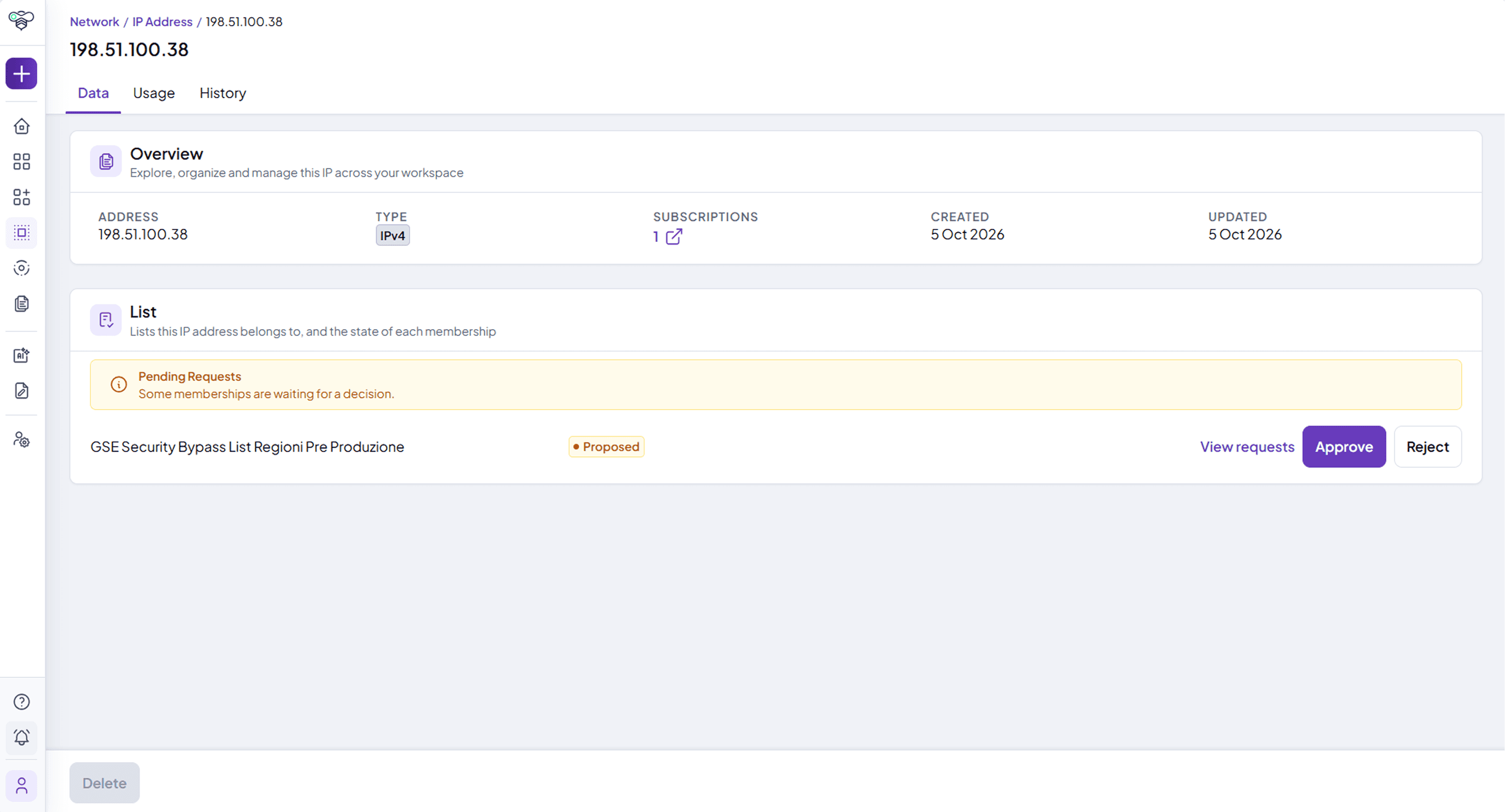
IP address detail with the overview, the subscriptions using it and the list of memberships

Lists

Lists are configured on the tenant by the platform operators and are not created from the user interface. Each list:

  • has a type;

  • is associated with one or more API environments. The IP addresses declared in a subscription are added to the lists associated with the environment of the subscription. A list not associated with any environment has no effect;

  • can define validation policies that restrict which IP addresses are accepted on that list.

For each list, the Platform shows the number of IP addresses that are Active, Under review and Unauthorized.

IP address lifecycle

The status of an IP address is always defined with respect to a specific list. The lifecycle is divided into macro-states, each containing sub-states:

  • Proposed

    • Proposed: the initial state of a newly declared or newly added IP address.

    • Approving: a transitional state in which, if integrated with external security systems, the Platform performs synchronization operations to authorize the address on the list.

    • Approving error: if an issue occurs during synchronization, the address enters this state and the operation can be retried.

  • Approved

    • Approved: the address is authorized on the list.

    • Rejecting: a transitional state in which, if integrated with external security systems, the Platform performs synchronization operations to remove the address from the list.

    • Rejecting error: if an issue occurs during removal, the address enters this state and the operation can be retried.

  • Rejected

    • Rejected: the address is not authorized on the list.

    • Approving (re-admission): a rejected address can be re-admitted to the list.

    • Approving error: if an issue occurs during re-admission, the address enters this state and the operation can be retried.
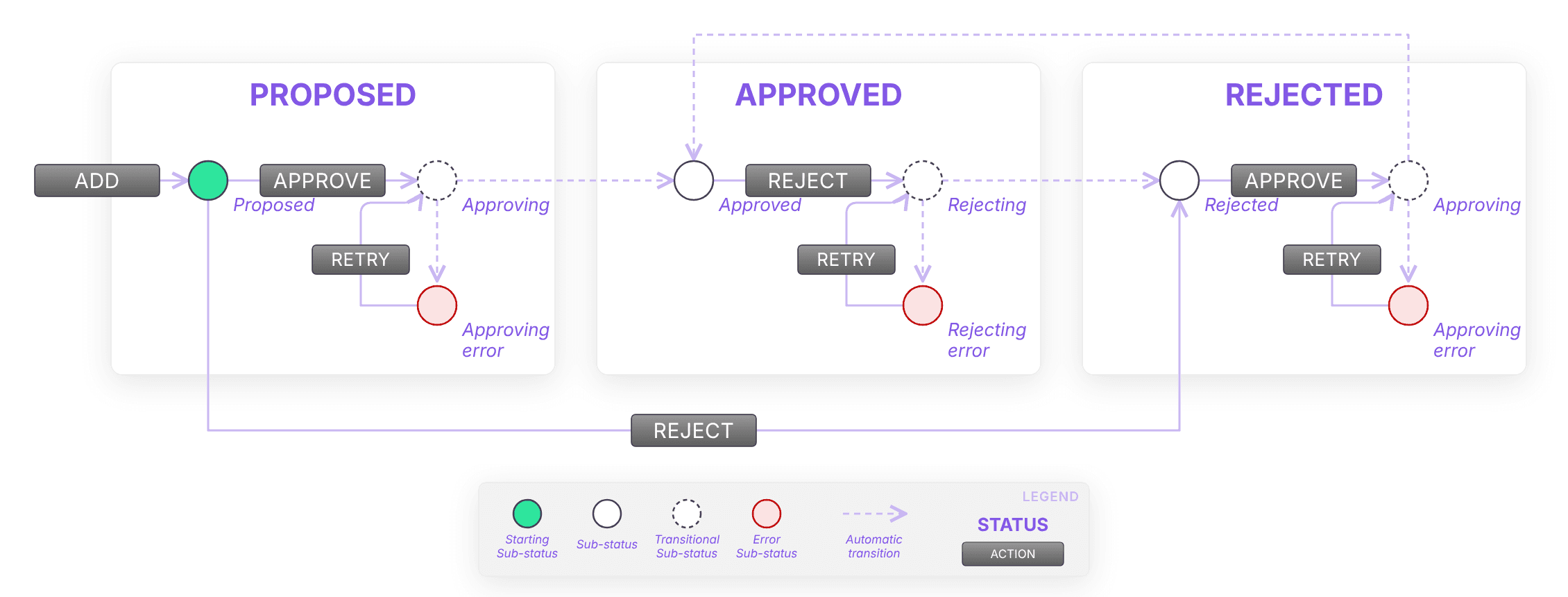
IP address lifecycle: proposed, approved and rejected states with the retry transitions

State transitions

  1. Proposed → Approved (Action: Approve): the address passes through Approving and becomes Approved.

  2. Proposed → Rejected (Action: Reject): the request is denied.

  3. Approved → Rejected (Action: Reject): the address passes through Rejecting and becomes Rejected. The address exits the list and the traffic is no longer authorized.

  4. Rejected → Approved (re-admission): the address passes through Approving and becomes Approved again.

  5. Approving error / Rejecting error (Action: Retry): the interrupted transition resumes (Approving → Approved, Rejecting → Rejected).

No transition is one-click: every action opens a confirmation dialog with a comment field, whose length and mandatory rules are configured for the Platform.

An IP address can be deleted only when all its memberships are Rejected and no subscription is requesting it. An IP address still authorized on a list can't be deleted.

Relationship with subscriptions

IP addresses are declared in a dedicated step of the subscription request, where the Platform reminds the user that two approvals are required: one for the subscription and one for the IP addresses.

  • When a subscription is requested, the requested IP addresses become declared addresses. Their status on the list follows their own approval.

  • When a subscription is rejected, the pending IP addresses are not declared.

  • In the subscription details, the IP block of the Technical info section shows each declared address with its status: Authorized, Under review or Unauthorized.

  • On an active subscription, IP addresses can be added or removed together with the usage policy, in a single edit. The change must be approved: the subscription enters the Pending for Approval state, and the previous IP addresses remain valid until approval. If the change is rejected, the previous IP addresses are kept.

  • While a change is awaiting approval, the added addresses and the removed ones (shown struck through) are visible in the IP block, together with the "N added" / "N removed" counters.

  • If an IP address is rejected, the subscriptions that declared it remain visible, with status Unauthorized for that address.

Visibility, permissions and notifications

Different types of users can see and perform different actions in the Platform. These settings can be configured in real time directly in the administration panel, based on contract details and/or the customer's preferences. For the Network feature, the administration panel allows you to configure:

  • the availability of the Network section in the Workspace and of the IP step in the subscription request (disabled by default);

  • the filters available in the search bar (status, list, IP version) and the columns displayed in the IP address and list tables;

  • the actions that each role can perform on the IP Address entity (Create, Approve, Reject, Retry), through the Entities Permissions of roles of type Tenant Admin. By default these actions are reserved to the Owner; they can be assigned to a dedicated role, for example a security manager. Actions not granted to a role are not displayed to its users.

The Platform sends notifications for the following events of the IP address entity:

  • IP address proposed

  • IP address approved

  • IP address active / An IP address of your application is now active

  • IP address rejected / An IP address of your application has been rejected

  • IP address removed / An IP address of your application has been removed

  • IP address approval error

  • IP address removal error

Receivers (Push and/or Mail) can be configured in Administration → Notifications, as for the other entities.

  • Subscription management

  • Roles and permissions

  • Networking

  • Subscriptions management

  • Administration

Documentation menu

Introduction

Table of Contents

Concept

The Network feature allows the Platform to govern the client IP addresses used by consumer applications to call APIs. Consumers declare their IP addresses when requesting or updating a subscription. The addresses are collected in a central registry, where users with the appropriate permissions approve or reject them on the lists associated with the API environments.

Key functionalities include:

  • Client IP declaration on subscriptions: during the subscription request, consumers can declare one or more IP addresses (IPv4 or IPv6), optionally with a CIDR suffix (e.g., 192.168.1.0/24). The IP step is not mandatory, and it is shown only when the administrator has enabled it for the type of user (it is disabled by default).

  • IP suggestions: the Platform suggests the addresses already used by other subscriptions of the same application.

  • Centralized registry: all addresses are managed in the Network section of the Workspace, organized in two sub-sections: IP Address and List.

  • Independent approvals: the approval of a subscription and the approval of its IP addresses are independent of each other.

  • History: every action on an IP address is recorded with the action performed, the user who performed the action, the list, the resulting status, the comment entered and the date.

  • Notifications: the users involved are notified at each step of the IP address lifecycle.

Why IP governance matters

Restricting API access to known IP addresses adds a network-level security layer to the access controls provided by subscriptions and key sets. A centralized registry gives a single point of control over which addresses are requested, by which applications and for which APIs, keeping every authorization traceable.

Main elements

IP addresses

An IP address can be declared in a subscription or added directly to the registry by users with the appropriate permissions. When added directly The address must comply with the policies configured on the selected lists.

The same address can belong to more than one list. For each list it belongs to, the address has its own status. For this reason, in the IP Address sub-section the same address appears once for each list it belongs to.

An IP address is shared among the subscriptions that declare it: the registry shows how many subscriptions are using each address.

IP address detail with the overview, the subscriptions using it and the list of memberships

Lists

Lists are configured on the tenant by the platform operators and are not created from the user interface. Each list:

  • has a type;

  • is associated with one or more API environments. The IP addresses declared in a subscription are added to the lists associated with the environment of the subscription. A list not associated with any environment has no effect;

  • can define validation policies that restrict which IP addresses are accepted on that list.

For each list, the Platform shows the number of IP addresses that are Active, Under review and Unauthorized.

IP address lifecycle

The status of an IP address is always defined with respect to a specific list. The lifecycle is divided into macro-states, each containing sub-states:

  • Proposed

    • Proposed: the initial state of a newly declared or newly added IP address.

    • Approving: a transitional state in which, if integrated with external security systems, the Platform performs synchronization operations to authorize the address on the list.

    • Approving error: if an issue occurs during synchronization, the address enters this state and the operation can be retried.

  • Approved

    • Approved: the address is authorized on the list.

    • Rejecting: a transitional state in which, if integrated with external security systems, the Platform performs synchronization operations to remove the address from the list.

    • Rejecting error: if an issue occurs during removal, the address enters this state and the operation can be retried.

  • Rejected

    • Rejected: the address is not authorized on the list.

    • Approving (re-admission): a rejected address can be re-admitted to the list.

    • Approving error: if an issue occurs during re-admission, the address enters this state and the operation can be retried.

IP address lifecycle: proposed, approved and rejected states with the retry transitions

State transitions

  1. Proposed → Approved (Action: Approve): the address passes through Approving and becomes Approved.

  2. Proposed → Rejected (Action: Reject): the request is denied.

  3. Approved → Rejected (Action: Reject): the address passes through Rejecting and becomes Rejected. The address exits the list and the traffic is no longer authorized.

  4. Rejected → Approved (re-admission): the address passes through Approving and becomes Approved again.

  5. Approving error / Rejecting error (Action: Retry): the interrupted transition resumes (Approving → Approved, Rejecting → Rejected).

No transition is one-click: every action opens a confirmation dialog with a comment field, whose length and mandatory rules are configured for the Platform.

An IP address can be deleted only when all its memberships are Rejected and no subscription is requesting it. An IP address still authorized on a list can't be deleted.

Relationship with subscriptions

IP addresses are declared in a dedicated step of the subscription request, where the Platform reminds the user that two approvals are required: one for the subscription and one for the IP addresses.

  • When a subscription is requested, the requested IP addresses become declared addresses. Their status on the list follows their own approval.

  • When a subscription is rejected, the pending IP addresses are not declared.

  • In the subscription details, the IP block of the Technical info section shows each declared address with its status: Authorized, Under review or Unauthorized.

  • On an active subscription, IP addresses can be added or removed together with the usage policy, in a single edit. The change must be approved: the subscription enters the Pending for Approval state, and the previous IP addresses remain valid until approval. If the change is rejected, the previous IP addresses are kept.

  • While a change is awaiting approval, the added addresses and the removed ones (shown struck through) are visible in the IP block, together with the "N added" / "N removed" counters.

  • If an IP address is rejected, the subscriptions that declared it remain visible, with status Unauthorized for that address.

Visibility, permissions and notifications

Different types of users can see and perform different actions in the Platform. These settings can be configured in real time directly in the administration panel, based on contract details and/or the customer's preferences. For the Network feature, the administration panel allows you to configure:

  • the availability of the Network section in the Workspace and of the IP step in the subscription request (disabled by default);

  • the filters available in the search bar (status, list, IP version) and the columns displayed in the IP address and list tables;

  • the actions that each role can perform on the IP Address entity (Create, Approve, Reject, Retry), through the Entities Permissions of roles of type Tenant Admin. By default these actions are reserved to the Owner; they can be assigned to a dedicated role, for example a security manager. Actions not granted to a role are not displayed to its users.

The Platform sends notifications for the following events of the IP address entity:

  • IP address proposed

  • IP address approved

  • IP address active / An IP address of your application is now active

  • IP address rejected / An IP address of your application has been rejected

  • IP address removed / An IP address of your application has been removed

  • IP address approval error

  • IP address removal error

Receivers (Push and/or Mail) can be configured in Administration → Notifications, as for the other entities.

  • Subscription management

  • Roles and permissions

  • Networking

  • Subscriptions management

  • Administration

Documentation menu

Introduction

Table of Contents

Concept

The Network feature allows the Platform to govern the client IP addresses used by consumer applications to call APIs. Consumers declare their IP addresses when requesting or updating a subscription. The addresses are collected in a central registry, where users with the appropriate permissions approve or reject them on the lists associated with the API environments.

Key functionalities include:

  • Client IP declaration on subscriptions: during the subscription request, consumers can declare one or more IP addresses (IPv4 or IPv6), optionally with a CIDR suffix (e.g., 192.168.1.0/24). The IP step is not mandatory, and it is shown only when the administrator has enabled it for the type of user (it is disabled by default).

  • IP suggestions: the Platform suggests the addresses already used by other subscriptions of the same application.

  • Centralized registry: all addresses are managed in the Network section of the Workspace, organized in two sub-sections: IP Address and List.

  • Independent approvals: the approval of a subscription and the approval of its IP addresses are independent of each other.

  • History: every action on an IP address is recorded with the action performed, the user who performed the action, the list, the resulting status, the comment entered and the date.

  • Notifications: the users involved are notified at each step of the IP address lifecycle.

Why IP governance matters

Restricting API access to known IP addresses adds a network-level security layer to the access controls provided by subscriptions and key sets. A centralized registry gives a single point of control over which addresses are requested, by which applications and for which APIs, keeping every authorization traceable.

Main elements

IP addresses

An IP address can be declared in a subscription or added directly to the registry by users with the appropriate permissions. When added directly The address must comply with the policies configured on the selected lists.

The same address can belong to more than one list. For each list it belongs to, the address has its own status. For this reason, in the IP Address sub-section the same address appears once for each list it belongs to.

An IP address is shared among the subscriptions that declare it: the registry shows how many subscriptions are using each address.

IP address detail with the overview, the subscriptions using it and the list of memberships

Lists

Lists are configured on the tenant by the platform operators and are not created from the user interface. Each list:

  • has a type;

  • is associated with one or more API environments. The IP addresses declared in a subscription are added to the lists associated with the environment of the subscription. A list not associated with any environment has no effect;

  • can define validation policies that restrict which IP addresses are accepted on that list.

For each list, the Platform shows the number of IP addresses that are Active, Under review and Unauthorized.

IP address lifecycle

The status of an IP address is always defined with respect to a specific list. The lifecycle is divided into macro-states, each containing sub-states:

  • Proposed

    • Proposed: the initial state of a newly declared or newly added IP address.

    • Approving: a transitional state in which, if integrated with external security systems, the Platform performs synchronization operations to authorize the address on the list.

    • Approving error: if an issue occurs during synchronization, the address enters this state and the operation can be retried.

  • Approved

    • Approved: the address is authorized on the list.

    • Rejecting: a transitional state in which, if integrated with external security systems, the Platform performs synchronization operations to remove the address from the list.

    • Rejecting error: if an issue occurs during removal, the address enters this state and the operation can be retried.

  • Rejected

    • Rejected: the address is not authorized on the list.

    • Approving (re-admission): a rejected address can be re-admitted to the list.

    • Approving error: if an issue occurs during re-admission, the address enters this state and the operation can be retried.

IP address lifecycle: proposed, approved and rejected states with the retry transitions

State transitions

  1. Proposed → Approved (Action: Approve): the address passes through Approving and becomes Approved.

  2. Proposed → Rejected (Action: Reject): the request is denied.

  3. Approved → Rejected (Action: Reject): the address passes through Rejecting and becomes Rejected. The address exits the list and the traffic is no longer authorized.

  4. Rejected → Approved (re-admission): the address passes through Approving and becomes Approved again.

  5. Approving error / Rejecting error (Action: Retry): the interrupted transition resumes (Approving → Approved, Rejecting → Rejected).

No transition is one-click: every action opens a confirmation dialog with a comment field, whose length and mandatory rules are configured for the Platform.

An IP address can be deleted only when all its memberships are Rejected and no subscription is requesting it. An IP address still authorized on a list can't be deleted.

Relationship with subscriptions

IP addresses are declared in a dedicated step of the subscription request, where the Platform reminds the user that two approvals are required: one for the subscription and one for the IP addresses.

  • When a subscription is requested, the requested IP addresses become declared addresses. Their status on the list follows their own approval.

  • When a subscription is rejected, the pending IP addresses are not declared.

  • In the subscription details, the IP block of the Technical info section shows each declared address with its status: Authorized, Under review or Unauthorized.

  • On an active subscription, IP addresses can be added or removed together with the usage policy, in a single edit. The change must be approved: the subscription enters the Pending for Approval state, and the previous IP addresses remain valid until approval. If the change is rejected, the previous IP addresses are kept.

  • While a change is awaiting approval, the added addresses and the removed ones (shown struck through) are visible in the IP block, together with the "N added" / "N removed" counters.

  • If an IP address is rejected, the subscriptions that declared it remain visible, with status Unauthorized for that address.

Visibility, permissions and notifications

Different types of users can see and perform different actions in the Platform. These settings can be configured in real time directly in the administration panel, based on contract details and/or the customer's preferences. For the Network feature, the administration panel allows you to configure:

  • the availability of the Network section in the Workspace and of the IP step in the subscription request (disabled by default);

  • the filters available in the search bar (status, list, IP version) and the columns displayed in the IP address and list tables;

  • the actions that each role can perform on the IP Address entity (Create, Approve, Reject, Retry), through the Entities Permissions of roles of type Tenant Admin. By default these actions are reserved to the Owner; they can be assigned to a dedicated role, for example a security manager. Actions not granted to a role are not displayed to its users.

The Platform sends notifications for the following events of the IP address entity:

  • IP address proposed

  • IP address approved

  • IP address active / An IP address of your application is now active

  • IP address rejected / An IP address of your application has been rejected

  • IP address removed / An IP address of your application has been removed

  • IP address approval error

  • IP address removal error

Receivers (Push and/or Mail) can be configured in Administration → Notifications, as for the other entities.

  • Subscription management

  • Roles and permissions

  • Networking

  • Subscriptions management

  • Administration